
You must log in or register to comment.
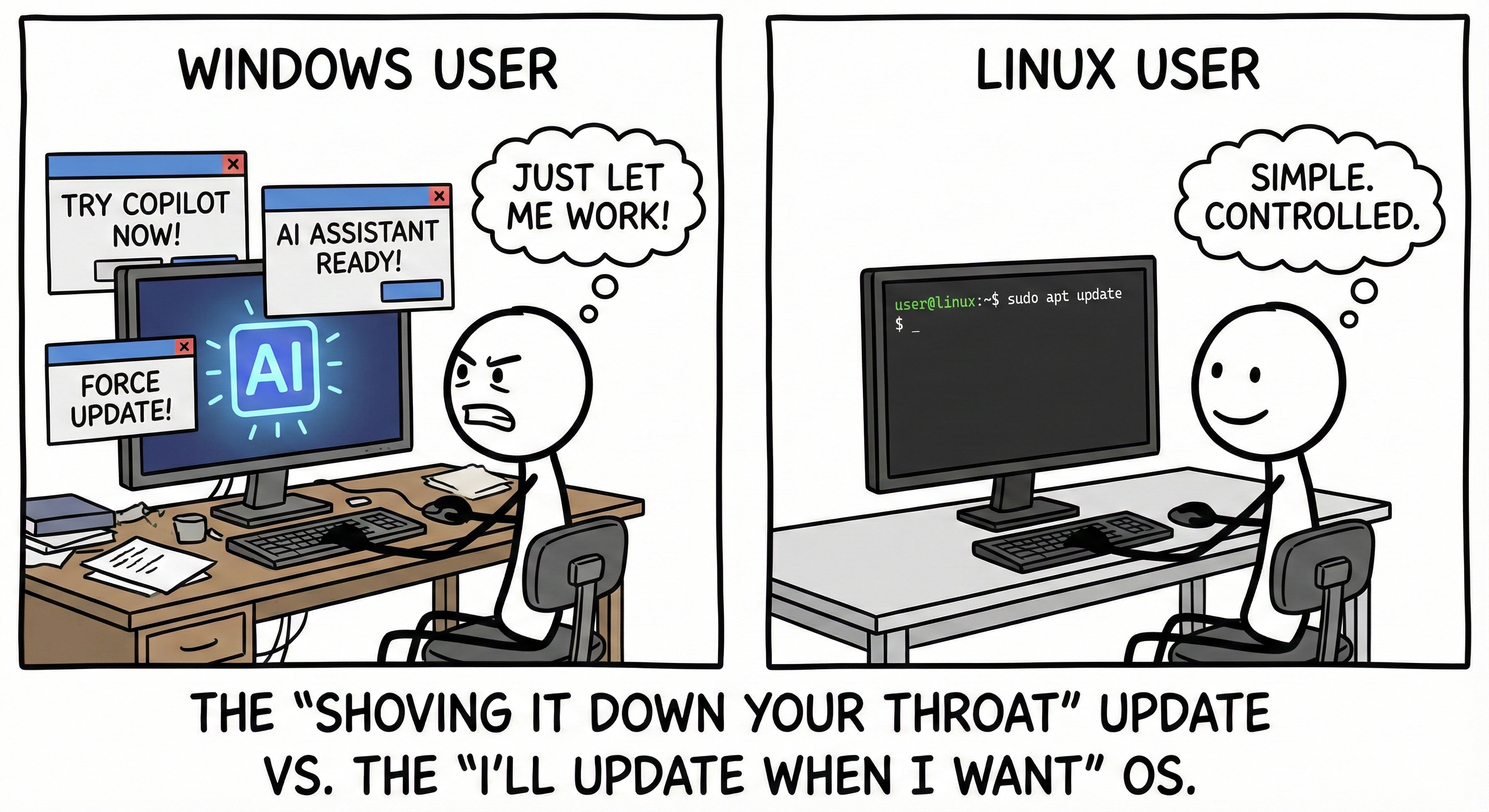
The irony that the meme has multiple popups about AI being bad while the entire meme is AI-generated.
I agree. Can’t quite put my finger on it… maybe the window behind the monitor? I try not to assume simply because of the style, but the lack of author credit makes it hard to check anyway.The weird thing is it wouldn’t at all be hard to draw by hand.
Edit: I like all the different answers. It feels like a new, unfortunate version of the “find the differences” game.
It’s also the font on the pop-ups, and the AI logo.
There’s a very generic style of Facebook cartoon that these things absolutely nail.
It’s also the total failure of a punch line in the second frame. Just so robotic sounding.
Check out the random items on the desk. They make no sense.
But yes, the biggest giveaway is those slightly blurry pop ups and that not-quite-comicsans font you see in all that slop.
keyboard
Left side. There is a thing next to the books and the handle of the coffee cup is wonky.
I think it’s the speech bubbles
Source or it’s AI
Its obviously AI
Apart from my comment, here’s the tldr:
The outlines, the thought bubbles, the general senselessness of the meme and it not being tied to anything Linux users normally do, instead being based on stereotypical stuff regurgitated by most youtubers now
Also the Terminal on the left is just nonsense
Check out the daily slop of Eli the Computer guy, the thumbnails are all AI slop and generally you can really see the parallels once you look at those vs this image
Also the Terminal on the left is just nonsense
there is no terminal on the left?
On the right I mean. Specifically, an apt update neither upgrades the packages (only syncs the repo), nor should it magically change your shell to sh without giving you any output, except if you enabled the --silent option, which was not enabled in this case, and even then I’m pretty certain it would only cut out verbose output like the specific repos, but not the „synced repos. X packages can be upgraded” message.
right, makes sense
The font stands out, too.
Also this in another post from the same guy.

The AI Generated anti AI Meme.
Also, the example has nothing to do with updating or not.
What makes you think, that this is AI
The typical Font, the typical drawing style
It is generally
- not a known meme template
- not a „normal” font style like impact, used by most no effort memes
–> pretty big effort
- maybe artist?
–> no Mark, not known like xkcd, pizzacake, cyanide and happiness (which would have been most likely)
- pretty typical AI font style, weird curly but at the same time straight font
- also the outlines remind me really much of AI slop
- If anyone might have drawn it, the monitor and desk would have stayed the same. If they wanted to do it in a more obvious way that these are 2 different people, they would have added more of a color and/or person differentiation with clothing or other desks. Instead the image is copied and pasted 95%, except for small, usually not noticable changes like the corners of the image. This is generally how AI images look using the same input, only having the random parameters that are usually inserted into the image generator change.
Its literally the same line thickness
Also, random notes: Thought bubble looks really like AI, nonsense Terminal commands consisting of a mix of Ubuntu/Debian default bash and sh??? (sh usually only has a $)
The template „AI vs no need to update” generally has nothing to do with each other, and is generally just the stuff regurgitated by just about every YouTube channel by now; unlike most Linux users memes, which ranges generally in more niche topics
- Windows AI, Forced updates
- Linux no AI, Terminal, Debian commands
Also, as https://lemmy.world/comment/21278707 @AeonFelis has pointed out, the image is 5mb big.
Also, a resolution of 2816x1536 is not normal
Almost just like it is not normal for such an image not to be tagged by your Graphics Program that you used to make it
TL;DR: this is what happens if you ask grok to make a Meme about Linux and windows from the meaning depth to the weird art
Check out the other great dissection
https://lemmy.world/comment/21275322
And the fact you are even denying it, yet posting the most obvious slop, makes it even funnier
Might add to it later, but I think if you already read this, you might as well look at the PIC and my example and decide for yourself
also the ai junk lines close to the books
That looks more like the general „Lines instead of actual text” used by many artists
Not really an AI thing
i’m talking about the gray thing with random lines coming out of it
What’s with the random comma? It makes absolutely no sense. And then you decided to not use a question mark, both those things are just so odd. And HOW do you not see that it’s an AI generated image? This whole comment section is about how obvious it is, with many examples why. It almost feels like your comment is some rage bait shit.
hey bro this image kinda smells AI Generated my man
deleted by creator
Help me out here whippersnapper, all I can see that is suspicious is the coffee cup and grey note next to it, but everything else looks clean
For me it’s the text (too regular and perfectly-ruled to be hand lettered, but too much variance between the letterforms to be a font) and the little AI artifact on the random doohickey directly under the bottom left corner of the AI computer monitor:

Aside from that, it’s just the weight of unmotivated choices. Why is the “good” side of the image grayscale while the “bad” side is in color (a human probably would’ve done it the other way)? Why are the desks drawn slightly differently while the person, chair, and computer are drawn the same (a human would’ve probably made everything identical to better illustrate their point)? Why all the random clutter on one but not the other (if the point was to make the AI computing experience look scattered and cluttered, surely they would’ve made it more overwhelmingly cluttered, but if it was for verisimilitude they’d have put clutter on both desks)? Also, subjectively, the “AI” logo on the screen suggests a pleasant experience, not an oppressive one.
An unmotivated choice on its own isn’t necessarily an AI calling card, but enough of them together alongside one or two smoking guns can definitely make the case pretty strongly.
There are cables in the windows side but not the Linux side, which also seems like an odd choice for a human to make to me.
Agreed, good catch.
It’s becuase they told the ai to make the right side simple so it simplified everything.
It’s not just ai slop, they also used sloppy prompts.
The desk and the colours too. Impressive prompt predicting from you, are you sure you’re not ai?
What an astute and flattering observation! You are good and smart.
I am 100% real. Trust me bro.
If you’d like I can provide a list of human organs I contain. Would you like me to do that now?
All good points, thanks for this
It’s the hands. not enough fingers.
Yes, who in the right mind would draw a popup window behind the screen and forget to write the green command prompt in the second line
AI slop + it doesn’t make much sense to begin with
It’s not the automatic Updates themselves making Windows bad lol
Totally agree.
And here OP proves perfectly how Windows Updates have done a ton of collective damage to security by being a terrible experience.
Software MUST be always updated.
but then it breaks or the design team needed to justify its salary again or…
Then the problem lies with the software. Not updating it is not a solution
despite Debian propaganda (/hj)
This meme itself feels like AI slop. Also, as a dual user, AI is really not that prelevant on Windows, as opposed to my android phone. Not sure how things are on iPhone, but I heard apple intelligence is going “great”
Why is the image 5MB?
AI slop
DO YOU WANT US TO SET UP YOUR BACKUP NOW OR ASK AGAIN IN 3 DAYS?
*onedrive
It is onedrive but the screen I get presents it as setting up a backup of my files.
It’s not just AI, but new android phones drive me spare.
You can’t disable that. You can’t uninstall that. You can’t make a backup of the whole phone. You can’t make a backup of one app and restore it to a different phone, unless you go through Google. We’re going to install these apps you don’t want, and there’s no way to cancel it.
Grapheneos ftw
My Android phone app started to show me “suggestions” instead of the call history. Geez, thanks Google. Instead of calling my GF, imma call a proctologist.
And I just know this feature will soon be used to serve me even more ads. I mean, the play store is bad enough as it is.DeGoogle your phone.
And even simple things like the gallery is so bad, scanning your whole phone. I want the gallery yo show my photos, not my video collection or downloaded images.
I’m not rich, but if I could I’d jump ship with my xiaomi 13t.
check out the fossify gallery app. not on play store probably. it can ignore folders, or only look in some
Already got it ☺️ from F-Droid.
Pretty sure you can achieve the same with the standard gallery and other media apps by putting an empty file called
.nomediain the folders you want the apps to ignore. I’m using a third-party gallery app, but seems that the feature is widespread (likely because of the apps relying on Android’s own media scanning).Doesn’t work for me.
And to be honest, it feels like the whole “windows is usable you just have to…” do things all the time (then it gets removed from time to time, or changed or ignored)
Thanks for the tip though!
Just to check, did you put in the dot at the beginning of the file name? It’s the convention for hidden files in Unixes. Could just be that Xiaomi forgot to support this feature in their app, of course, and a third-party one would fix that, like the open-source Simple Gallery.
Anyway, I’d guess most people are fine with the gallery showing downloaded images — I know I need that to find the meme I want.
Yep I made it ‘hidden’ but it didn’t work. So maybe a Xiaomi thing for sure, and I already have the f-droid app so I’m good :-)
I had to chuckle in an exasperated way when I opened the Xbox app on my phone… and there’s a fucking Copilot tab in there as well.
I understand the use cases for AI, but Microsoft seems to be throwing the whole lot at the wall and seeing what sticks.
GrapheneOS forcing updates by default :(
If you don’t want a secure OS, you can at any time just install Linaege
That’s not the point. There are many reasons why unattended updates could be a pain. Stop trying to dismiss things like Daniel Micay
Forcing updates is horrible regardless of the reason
You must be too young to remember the months out of date mess that was the typical Windows system back in the XP days. Forget “I don’t have the latest service pack” it was more “I am still vulnerable to a two year old “zero day”!”
I really love my switch to linux. It’s not all sunshine and roses, i have some weird things that i can’t really fix. Some problems are “too hard” for me to fix and i don’t care enough. After installing Linux right after windows to dual boot, it’s so fucking nice to not have your computer trying to sell you shit all the time, and you don’t have to jump through hoops just to get you shit working.
What has been too hard to fix?
When my computer goes to sleep I no longer have audio when I resume using it. Unplugging and replugging my USB DAC is a workaround I’ve been using.
Yeah I’ve had similar problems. I use a usb/kvm switch to switch multiple laptops and desktops on a single monitor/keyboard/mouse. There should be a conf file somewhere that lets you set what gets switched when a usb gets plugged/unplugged or when the computer sleeps. I’m on my phone at the moment so I can’t easily look it up right now.
Let me know if you figure out where that is. Hopefully I can change that on Bazzite. Maybe I should consider hopping to base Fedora to avoid the atomic distro complications
Looks like this was a long time ago. I was using pulse audio on Ubuntu. Which I guess is ancient now. I had to edit /etc/pulse/default.pa And edit things like
load-module module-switch-on-connectwhich dealt with USB connect event handling.I don’t use bazzite, looks like that is a fedora based distro. Which I guess now uses pipewire/wireplumber. (And I guess ubuntu does too now?)
I would suggest googling something like “pipewire session.suspend-timeout-seconds”
You’ll find a bunch of similar issues:
This is for Mint, but I’m thinking this same “session.suspend-timeout-seconds” property is going to be what you are looking for.
It looks like setting that property to 0 might prevent suspend from stopping your audio.
If not, I think this gives you a pretty good idea of where to look for the config files:
/usr/share/wireplumberAnd from there, you can probably get a good idea of the various property names and what they do.
Might be off topic, but does anyone else dread the outcome of their Linux system after an update?
It seems like I always time my updates at the time when things go wrong. It makes me not even want to update my system at all, because it usually involves a lot of pain to get it back to a working AND updated state.
For example, last month on the 20th, I updated openSUSE Tumbleweed through zypper dup. All is well, and everything updated just fine. Well, after that update, I noticed Dolphin (the file browser that comes with KDE I think) crashes when creating a new folder in any of my drives, whether it be the main OS drive or one of my many HDDs inside of the computer case, or my NAS. Doesn’t matter, I go to create the folder, name it, and as soon as it is made, Dolphin freezes.
Well, I learned earlier this year that if my system is booting normally and able to play games (all I really care about to be honest), I REALLY shouldn’t touch it because the next update might break my stuff again. Well, on the 27th, I updated through zypper dup, and what do you know, my GEProton stuff no longer works. So, I spent the entire afternoon trying to figure out what I can do to get it working again, fail, boot back into a snapshot from before the update.
So, I just wanted to know what everyone else feels about updating their systems, especially if you have a similar use case like mine. :/
No, but every system I’ve put together so far has been either ultra basic or specifically purchased for Linux compatibility.
Your system might need some variety of priest by the sound of it, though I’ve had my own set of weirdness, so I can’t judge. I just found out the reason native Linux games have been such pigs is because the integrated graphics nothing was supposed to use was being used.
On debian, I never worry - most of my regular use computers are that. Maybe hesitant about a dist-upgrade, but i backup all my home and main edited config , and apt-list regularly anyway.
on my arch that i use regularly I never worry.
on steam deck never worry - kind of obviously.
On my arch system that i only use occasionally i just expect trouble whenever i go back to it after a too long (say 2 months i’d be edgy)…
I always run my backup procedure first - i have to anyway to sync my home folders.
update archlinux-keyring first as that’s the most common issue .
if any dependency issue emerges that cant be fixed by removing one or two packages or using pacman-static - i normally just go straight back to live usb and chroot, or be prepared to reformat and jump back to the pacstrap part of install process and reinstall base system.
I dont even game on my Linux system and every time it updates I know I have a frustrating night ahead of me.
Maybe just an Ubuntu thing but actually my steam deck has had to roll back a few times as well… At least it had that option unlike Ubuntu.
Maybe it is because I am using mine for network related apps that they are always what breaks but man it seems like some major backed component gets a rewrite every so often just to see if it is better. I have had so many port issues and network issues it makes me want to be Amish. That and trying to get video thumbnails back that one time. Wasnt a total nightmare but weird that it took me days to figure out that apparently I had to delete the cache then reinstall ffmpegthumbnailer…
So, no, not alone. Hate updates. Hate them so much.Have you tried Nemo by the way? Kinda like it better than Dolphin.
I feel like if I didn’t game and use my computer the way I do, my Linux experience would be like most that you see on the web. “It just works!” and all of that.
The Steam Deck has had one hiccup in my two years on it, and I just put it away until the next update, and poof, all fixed! I also use Decky plugins, so that could’ve very well been my issue!
I definitely feel you on the backend stuff. I upgraded one time and noticed that I had to wait a few days if not a week until I could use one of my apps, Proton Mail Bridge I believe, since the window wasn’t showing except for the title bar and the minimize, fullscreen, and exit buttons.
It’s… really weird how it all works until it doesn’t, which isn’t something I have ever experienced on Windows, though I keep in mind that this is all a community effort and the operating system really is good at its core, but I think it needs some people like me or you to bring these pain points up so they are seen and maybe even worked on.
Give me a Linux install, and I’ll show you how easily a user can wreck it just trying to recreate a workflow that they have on Windows. ;P
EDIT: No, I haven’t tried Nemo, but I will now that you’ve recommended it! Does it have split tab stuff like Dolphin? That’s a feature I use every single day to easily move stuff around all of my drives and NAS. :)
Might be off topic, but does anyone else dread the outcome of their Linux system after an update?
Not really. I don’t really worry about that on most of my system. There is ONE computer where an update is a source of stress, and that’s my main gaming computer where I had to setup dualbooting with windows. I learned the hard way that my motherboard implementation of UEFI kinda want windows to be there, otherwise it’s very picky into which disk is parsed for EFI boot entries. But beyond that, nah. Laptop, desktop, company servers… just roll the update/upgrade, and the dist-upgrade when needed, fix the updated configs (for servers) and it’s good to go. Been this way for the last decade or so.
Worthy of note, I’m on ubuntu LTS (24.04 for now) or Debian stable (for servers), so not exactly outdated (I have the latest nvidia drivers…) but not bleeding edge either. I probably avoid a lot of issues this way.
Thank you for your reply!
Are you using the same drive for the dual boot? I ripped a spare SSD from a dead laptop a few years back, and installed tiny11 onto it and used my newer SSD for openSUSE. I’ve never had any issues this way, if that helps?
My system is really just for PC gaming, so I understand!
Technically, all the boot options were on the same drive (same EFI partition, on the disk that was initially used for years by windows), but for some reason, the motherboard decided “nope, there’s no bootloader there”.
I ended up repartitioning the “first” drive seen by the bios to make a 100MB partition at the beginning, named it “EFI system partition”, copied all the content of the old one from the other drive, and nuked the actual windows install in the process (not the boot entry though). Now all is good… I hope :D
It sounds like maybe a rolling release distro like openSUSE Tumbleweed is not the best fit for you. The ‘fix the system after updates’ is supposed to be part of the fun for those that like rolling release.
I would suggest switching to a point release type distro, where you may end up with some bugs for a while, but they are the same bugs that you can figure out workarounds for.
edit: grammar
I don’t think distro hopping would be a good choice for me since I already have very little time to even game, let alone diagnose and fix my computer after what should be a simple update…
I’ve already painstakingly set my computer up the way I want it, which took days with the limited amount of time I have. It’s why I don’t want to update at all, actually, since when it is working fine, it’s working great. I also need the newer drivers and other stuff that a rolling release provides me, since I am trying to game mainly.
I can’t use immutable distros, because that over complicates me using my computer as my computer.
You don’t really need the newest drivers unless you want to play the newest games
I play games from the '90s all through the newest releases, so I do need the newest and most up to date drivers. Gaming is my hobby. :/
Fair enough, plenty of people just play a few years behind the current releases, so I just thought its worth mentioning. Sounds like you do need it tho
Ha! As if Ubuntu didnt update on its own and then completely killed my internet access because it changed the file system of how it stores DNS but didnt somehow do it right to the point of me spending 3 hours figuring out what file I had to recreate and why to get it working again.
Linux is cool but not this make believe version of cool.
I have no idea when it happened, but there’s a mechanism in place to download updates but only install them on reboot, kinda similar to windows, but when you want instead of when it want. It’s kinda the best of both world : updates are quick to install, downloaded in the background, and no workflow interruption.
Ah. I have only figured out the check for updates daily, weekly or never options. I am leaning into never as this is the third time an Ubuntu update has made me want to curl up in a ball and die.
I dont find thus constant tech support fun.
Weird. I understand you did have issues, but that’s so far from my experience. Despite major annoyance at the project’s direction, I’m staying on ubuntu because it’s been a mostly stress-free experience as a user (and I have an nvidia card, which does NOT help in that regard…).
Well see that’s your problem right there, you’re using ubuntu /j
Yeah. Maybe. I know I will never try arch again and I thought Ubuntu was supposed to be one of the good ones but its been so much stress.
I dont want to have to completely redo my whole system and all the software just to try a different OS flavordeleted by creator
It’s unusual that Linux users are so cool with tinkering to get everything exactly how they want. Unless it’s windows. No tinkering for them there.
It could have something to do with Microsoft ensuring you cannot tinker with Windows to get everything exactly how you want 🤷♀️
Sounds like a skill issue.
It is. Some have the skills for Linux
one needs third party apps of questionable trustworthiness and even then you can’t definitively verify it isn’t periodically screenshotting everything you do and uploading it with your unique tpm tied to it
I’d like to meet one Linux user who hasn’t run a user script they didn’t read every line of to ensure it didn’t do anything it shouldn’t do.